

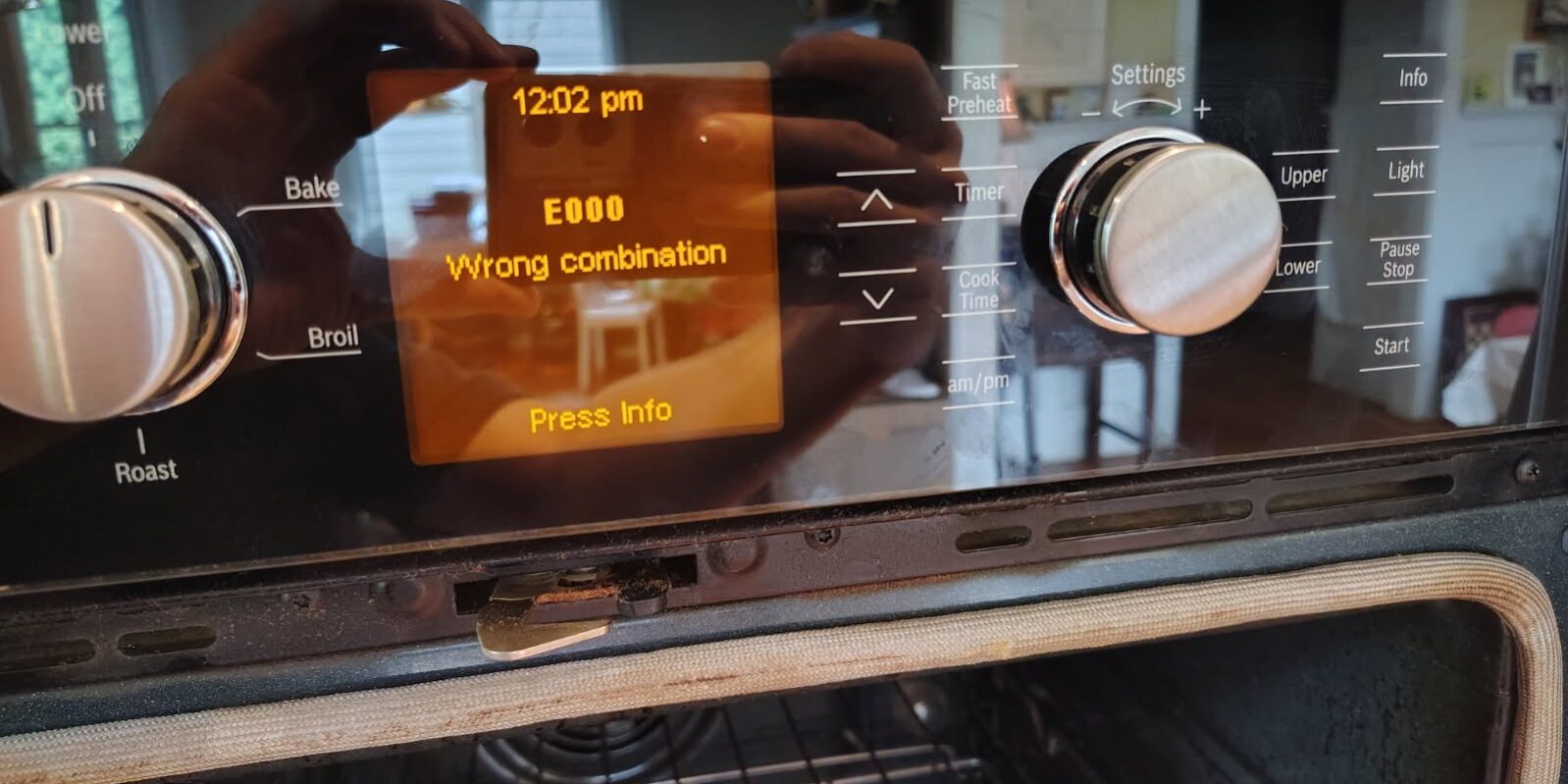
A Bosch built-in oven with a black display or E000 error can be frustrating because the appliance may have power, but the control panel will not properly start. Sometimes the screen stays completely black. In other cases, it may briefly display partial letters, strange characters, or an error code before becoming unresponsive.
Recently, our technicians at Atlanta City Appliance Repair diagnosed this exact problem on a Bosch built-in double oven model HBN5650UC/09.
The homeowner had already reset power to the oven several times, but the display would still not reboot correctly.
The problem in this particular Bosch oven turned out to be the user interface / touch panel.
Bosch Oven Model
Bosch HBN5650UC/09
Original Complaint
- Oven display would not power up correctly
- Screen sometimes remained completely black
- Display occasionally showed only partial letters or characters
- Power had already been reset several times
- Oven would not properly reboot
If you are experiencing a similar problem and need Bosch oven repair in Alpharetta, Roswell, Johns Creek, Sandy Springs, Marietta or the North Atlanta area, this repair is a good example of why proper diagnosis is important.
What Can Cause a Bosch Oven Display to Stay Black?
A black Bosch oven display does not automatically mean the entire oven needs to be replaced.
Depending on the model and symptoms, possible causes can include:
- Failed user interface or touch panel
- Main electronic control/relay board problem
- Communication problem between control modules
- Wiring or connector problem
- Power supply issue
- Control programming or option-code mismatch after replacing electronic components
In our repair, the problem was isolated to the touch panel / user interface.
The replacement part used was:
Bosch Interface / Touch Panel
Part #00686560
However, another component that may be involved in similar Bosch oven failures is the main control board, part #12022213.
That does not mean both parts should automatically be replaced. Proper testing is important before ordering expensive electronic components.
New Bosch Touch Panel Installed — Then E000 Appeared
After replacing the failed Bosch touch panel #00686560, the display powered back up.
But there was another problem:
Error Code E000 — Wrong Module Combination
At first, this may make it appear that the new touch panel is defective.
In many cases, it isn’t.
Bosch’s technical service information explains that E000 error means the oven’s electronic modules do not have the correct matching configuration or option code. Bosch describes E000 as a “Wrong Module Combination” condition.
The oven therefore needs to recognize the correct configuration for the particular model.
For the Bosch HBN56x0UC family, which includes our HBN5650UC/09, Bosch lists:
Option Code: 0841
Bosch’s official option-code table specifically lists HBN56x0UC = 0841.
After entering the proper option code, the replacement interface synchronized correctly with the oven controls and the E000 error cleared. Read full instruction here https://media3.bosch-home.com/Documents/58300000126640_abz_en_c.pdf
How to Enter Service Mode on Bosch HBN5x / HBL5x Built-In Ovens
Important: These instructions come from Bosch’s technical service bulletin for the HBL5x/HBN5x series. The exact procedure can differ on other Bosch models, so always verify your model number before attempting service mode.
For the Bosch HBN5650UC/09, the procedure is:
1. Start with the Cooking Mode Dial in OFF
Make sure the oven is powered but the Cooking Mode Dial is in the OFF position.
2. Press and Hold START and FAST PREHEAT
Press and hold:
START + FAST PREHEAT
at the same time.
3. Turn the Cooking Mode Dial Out of OFF
While continuing to hold both buttons, rotate the Cooking Mode Dial out of the OFF position.
4. Release START and FAST PREHEAT
The oven should now enter Service Mode. Bosch gives this procedure specifically for HBL5x/HBN5x ovens.
How to Set Bosch Option Code 0841
Once the oven is in Service Mode:
5. Locate the Correct Four-Digit Option Code
Bosch recommends verifying the four-digit option code either:
- On the label near the PC control board in the upper plenum, or
- In Bosch’s official option-code table.
For:
Bosch HBN56x0UC
the official Bosch table shows:
0841
6. Rotate the Settings Dial
Use the Settings Dial to change the displayed option code until you reach:
0841
7. Exit Service Mode
Rotate the upper oven Cooking Mode Dial back to OFF.
Bosch then instructs the technician to reset the time and date as necessary.
8. Power-Cycle the Oven
Bosch’s procedure recommends disconnecting power or switching the circuit breaker off for approximately:
30 seconds
Then restore power, set the time/date, and confirm that the error code has cleared and the oven operates normally.
Why Did E000 Appear After Replacing the Touch Panel?
An important detail in Bosch’s technical bulletin is that when both the user-interface module and control/relay module are replaced, the option code must be manually configured because the two new modules do not already know the oven’s configuration.
Bosch also states that when only one module is replaced, the remaining module should normally transfer the configuration to the new one automatically.
However, in our real-world repair, after replacing the touch interface the oven displayed E000, so we entered Service Mode and programmed the correct 0841 option code.
After programming, the new touch panel synchronized with the oven and the unit operated correctly.
This is an important troubleshooting point:
Seeing E000 immediately after installing a Bosch control panel does not necessarily mean the new part is defective. The oven may simply require the correct option code to be entered.
Bosch HBN5650UC/09 Black Screen Repair — Our Solution
For this North Atlanta Bosch oven repair, the repair sequence was:
Original symptom:
Black or partially functioning oven display
↓
Power resets did not correct the problem
↓
Diagnosis:
Failed user interface / touch panel
↓
Replaced:
Bosch Interface #00686560
↓
New symptom:
E000 — Wrong Module Combination
↓
Entered Bosch Service Mode
↓
Programmed Option Code:
0841
↓
Reset oven
↓
✅ Oven synchronized and operated normally
Does a Black Bosch Oven Screen Always Mean the Touch Panel Is Bad?
No.
Although the touch panel was the failure in this particular HBN5650UC/09, similar symptoms can sometimes originate from the main electronic control.
One board associated with these Bosch ovens is:
Bosch Main Control Board #12022213
Before replacing either expensive electronic part, the technician should verify power, wiring/connectors, communication between the modules and the specific symptoms.
Replacing electronic boards simply based on an error code can become expensive very quickly.
Bosch Oven Repair in Alpharetta, Roswell & North Atlanta
Atlanta City Appliance Repair provides appliance repair throughout Alpharetta and the North Atlanta area, including Roswell, Sandy Springs, Marietta, Cumming, Johns Creek, Buckhead, Brookhaven, Peachtree Corners and surrounding communities.
If your Bosch wall oven is experiencing:
- Black control panel
- Blank oven display
- Flickering or partial display
- Bosch E000 error
- Touch panel not responding
- Oven not starting
- Control board problems
- Error after replacing a Bosch interface
- Bosch double oven electronic problems
our technicians can diagnose the appliance and determine whether the problem is related to the touch interface, main control board, wiring or another component.
Need Bosch Oven Repair in Atlanta?
Atlanta City Appliance Repair, Inc.
📞 Call: (404) 903-1453
🌐 24/7 Online Appointment: AtlantaAppliancesRepair.net/Appointment
We service Alpharetta, Roswell, Johns Creek, Sandy Springs, Cumming, Marietta, Buckhead, Brookhaven and surrounding North Atlanta communities. Your website currently lists these areas among its service coverage.
Suggested FAQ Section for Google SEO
What does Bosch oven error E000 mean?
Bosch identifies E000 as a Wrong Module Combination error. It can occur when the oven’s user interface and control module do not have matching configuration information. The correct option code may need to be programmed through Service Mode.
What is the option code for Bosch HBN5650UC?
The Bosch technical bulletin lists HBN56x0UC option code 0841. The HBN5650UC belongs to that model family.
Why is my Bosch oven display completely black?
Possible causes include a failed touch panel/user interface, electronic control problem, wiring problem, or lack of proper power to the controls. Diagnosis is recommended before replacing electronic parts.
Can a Bosch oven show E000 after replacing the touch panel?
Yes. If the control modules do not have the correct matching configuration, the oven may display E000. Bosch provides a Service Mode procedure that allows the proper option code to be entered.
Can resetting the breaker fix a Bosch oven black screen?
A power reset can sometimes clear a temporary electronic problem, but repeated resets will not repair a failed user interface or control board. Bosch’s service procedure also calls for a 30-second power reset after programming the option code.
